> ## Documentation Index
> Fetch the complete documentation index at: https://docs.expectedparrot.com/llms.txt
> Use this file to discover all available pages before exploring further.
# Remote Inference
> Remote inference allows you to run surveys at the Expected Parrot server instead of locally on your own machine, and to use [Remote Caching](/en/latest/remote_caching) to store survey results and logs at your account.
*Note: You must have an Expected Parrot account in order to use remote inference and caching. By using remote inference you agree to any terms of use of service providers, which Expected Parrot may accept on your behalf and enforce in accordance with our terms of use.*
## How it works
When remote inference is activated, calling the run() method on a survey will send it to the Expected Parrot server. Survey results and job details (history, costs, etc.) are automatically stored at the server and accessible from your workspace or at the [Jobs](https://www.expectedparrot.com/home/remote-inference) page of your account.
By default, a remote cache is used to retrieve responses to any questions that have already been run. You can choose whether to use it or generate fresh responses to questions. See the [Remote Caching](/en/latest/remote_caching) section for more details.
## Activating remote inference
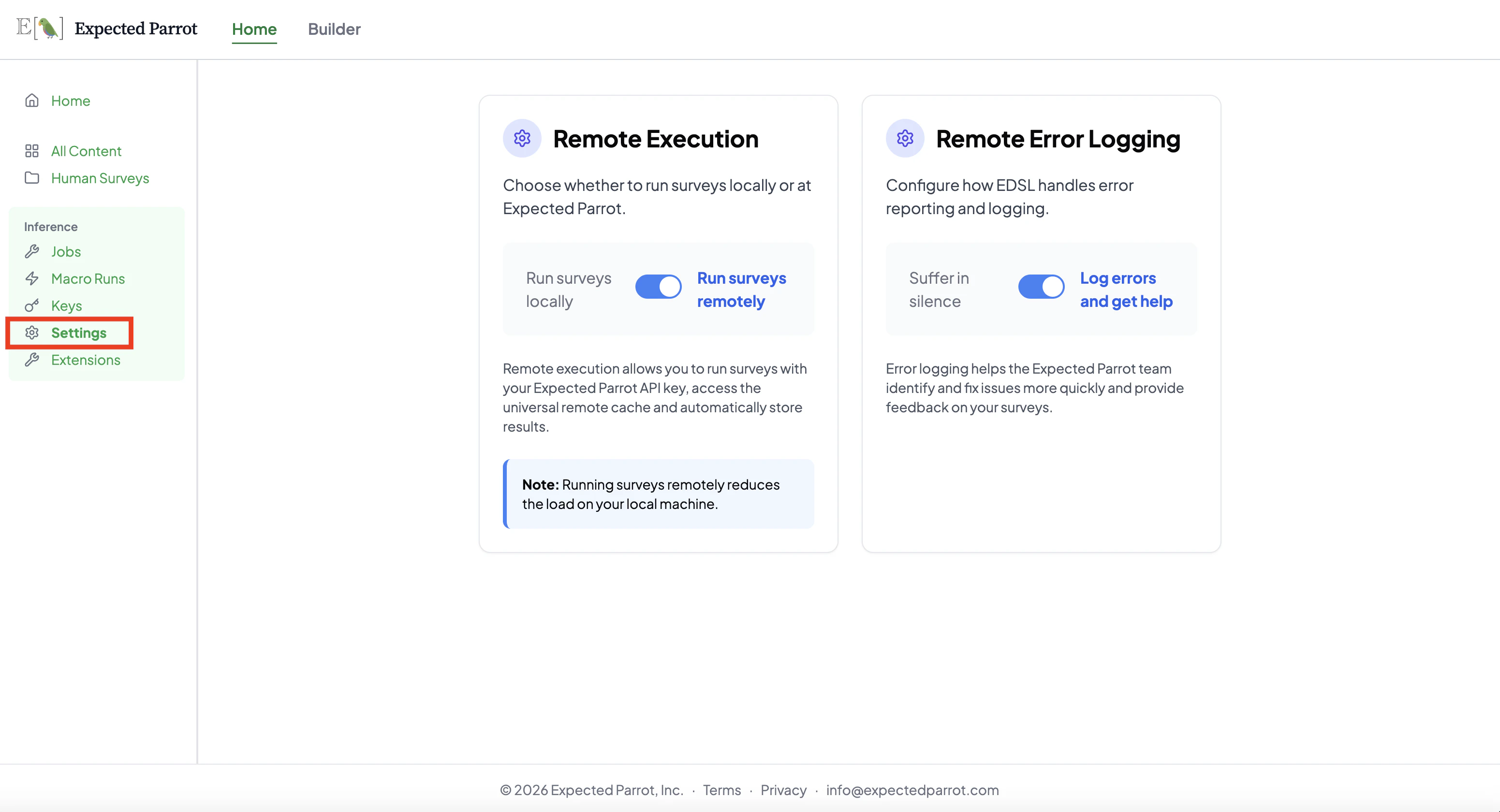
[Log in](https://www.expectedparrot.com/login) to your Expected Parrot account and navigate to your [Settings](https://www.expectedparrot.com/home/settings) page. Enable the **Run surveys remotely** toggle under Remote Execution:
 ## Managing keys
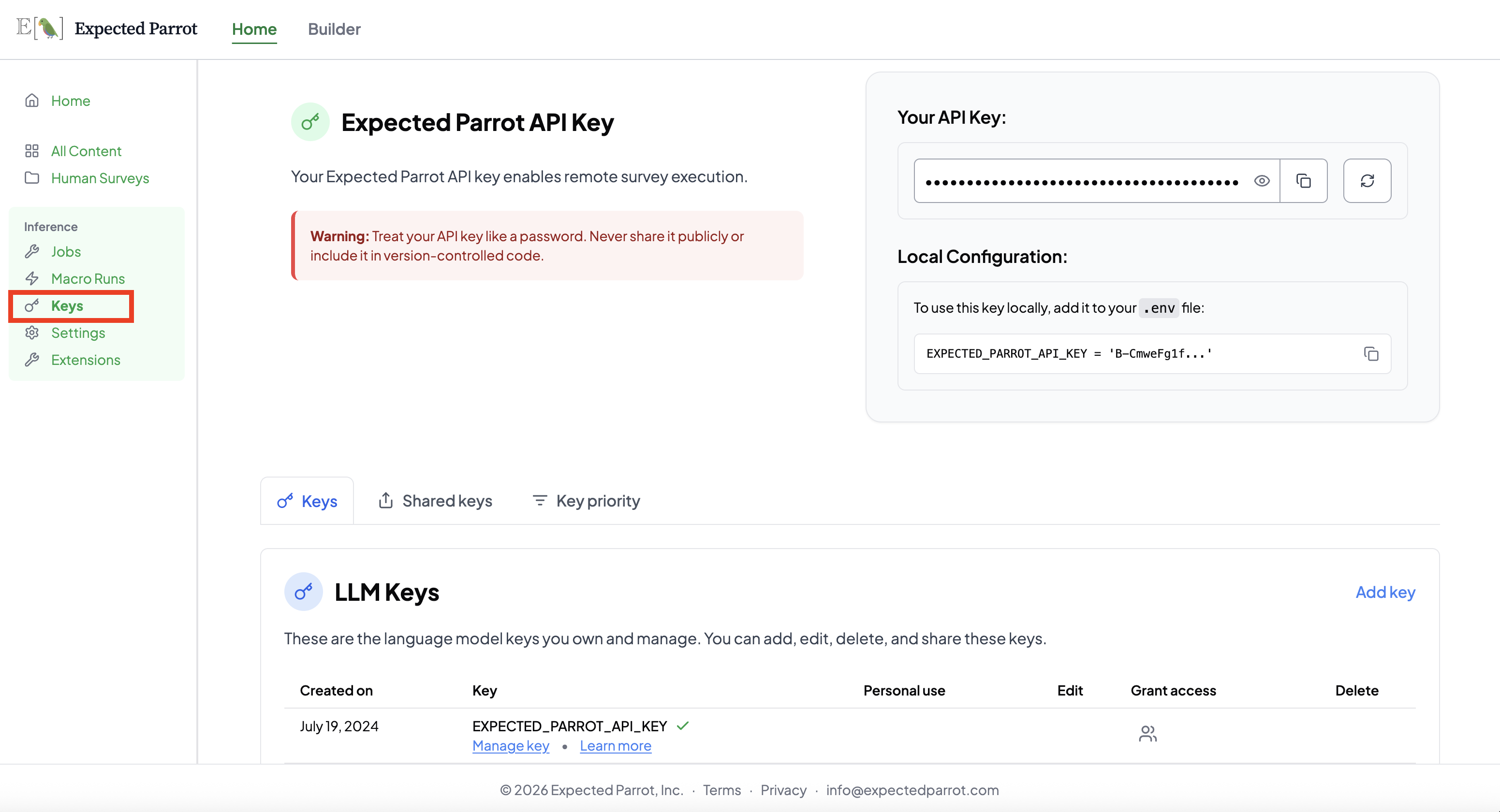
An Expected Parrot key is required to use remote inference and to interact with the platform. Your key can be viewed (and reset) at the [Keys](https://www.expectedparrot.com/home/keys) page of your account, which also shows the `.env` format for using it locally:
## Managing keys
An Expected Parrot key is required to use remote inference and to interact with the platform. Your key can be viewed (and reset) at the [Keys](https://www.expectedparrot.com/home/keys) page of your account, which also shows the `.env` format for using it locally:
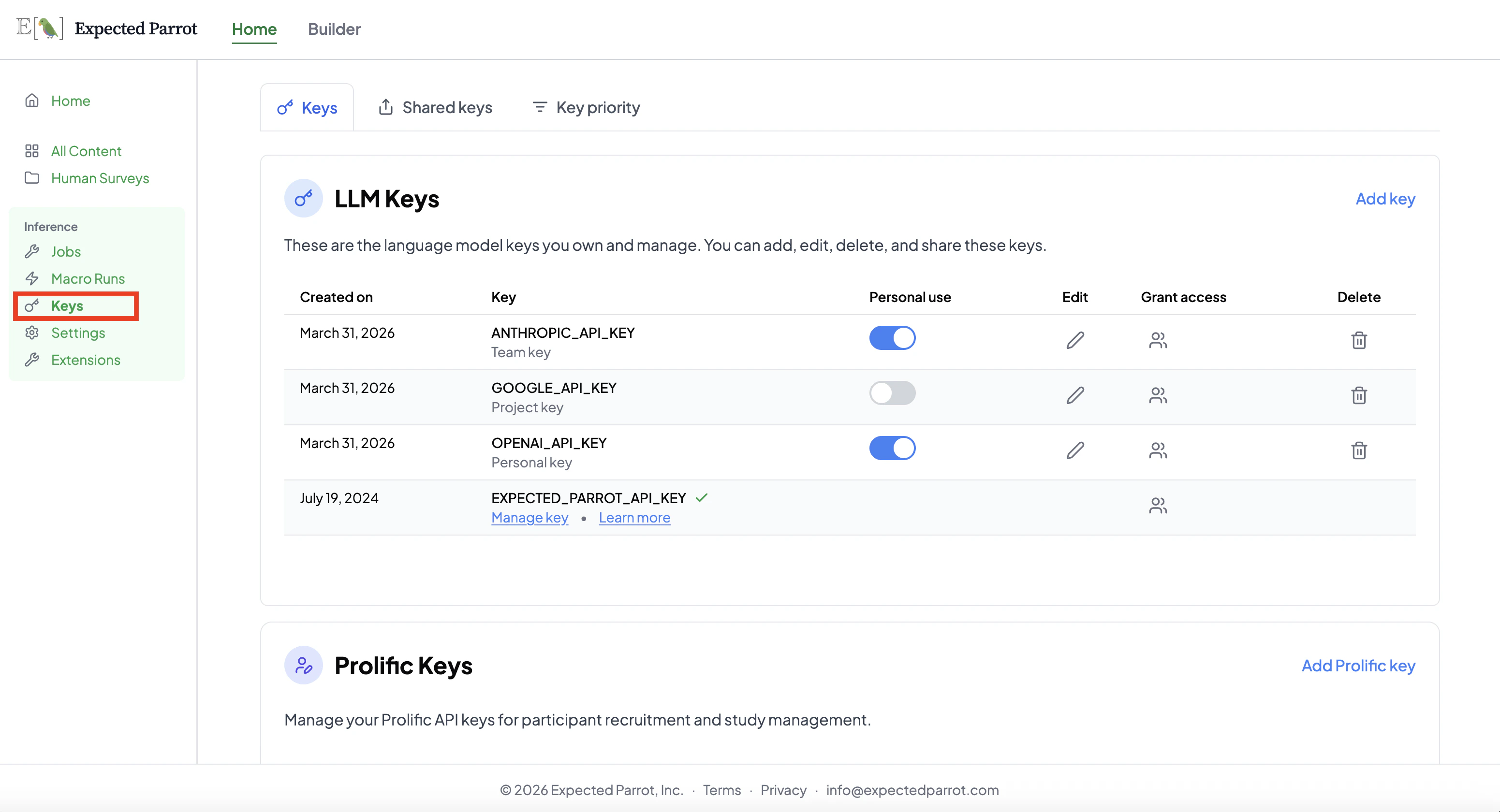
 You can also add your own LLM keys, grant access to other users, and set key priority at this page:
 See the [Managing Keys](/en/latest/api_keys) section for more details on methods for storing and managing keys.
## Credits
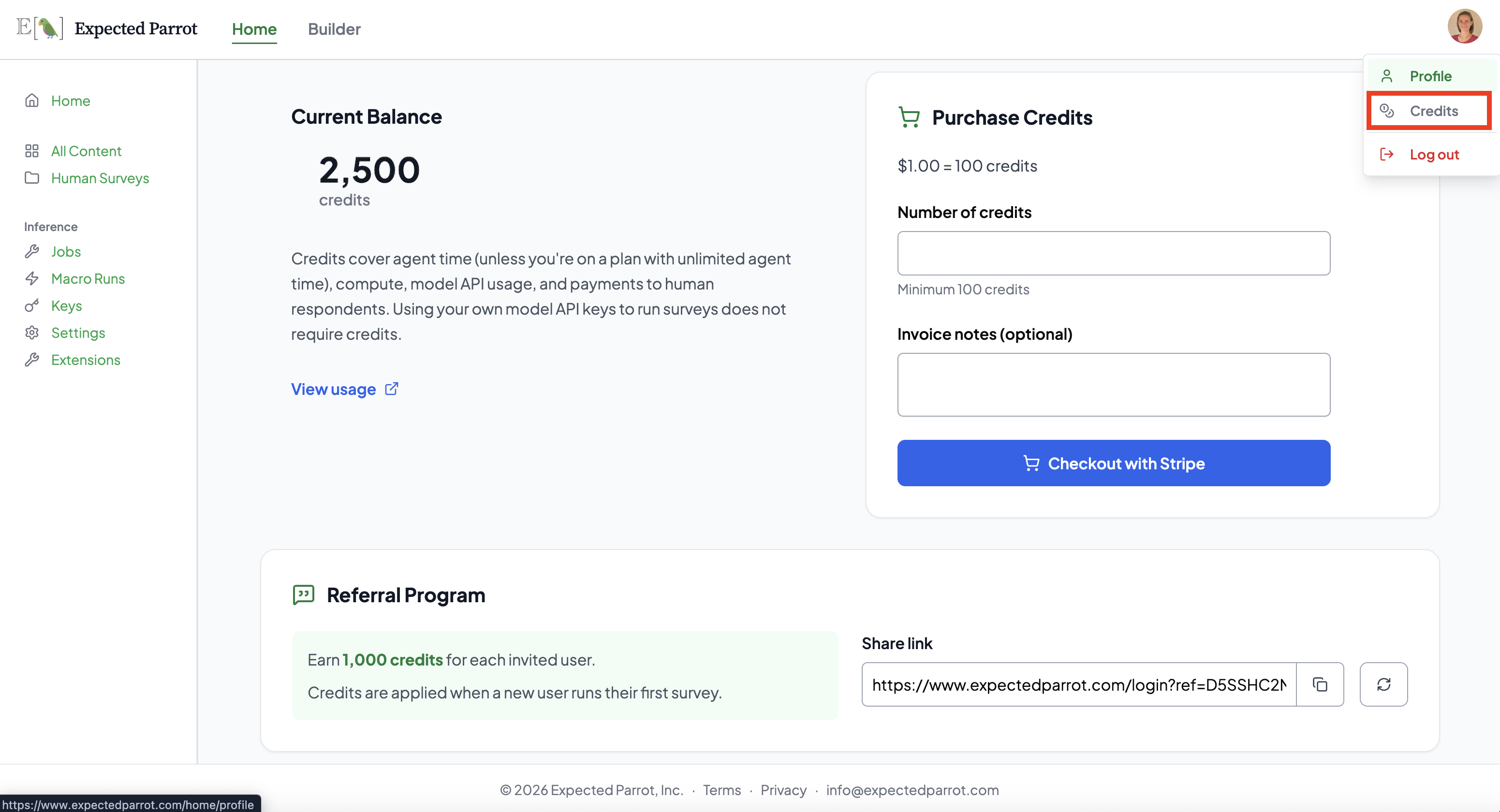
Running surveys with your Expected Parrot API key requires credits to cover API calls to service providers. Your account comes with free credits for getting started; you can check your balance and purchase additional credits at the [Credits](https://www.expectedparrot.com/home/credits) page of your account:
See the [Managing Keys](/en/latest/api_keys) section for more details on methods for storing and managing keys.
## Credits
Running surveys with your Expected Parrot API key requires credits to cover API calls to service providers. Your account comes with free credits for getting started; you can check your balance and purchase additional credits at the [Credits](https://www.expectedparrot.com/home/credits) page of your account:
 Running surveys with your own keys does *not* consume credits. Learn more about purchasing credits and calculating costs at the credits section.
## Using remote inference
When remote inference is activated, calling the run() method will send a survey to the Expected Parrot server. You can access results and all information about the job (history, costs, etc.) from your workspace or your [Jobs](https://www.expectedparrot.com/home/remote-inference) page.
For example, here we run a simple survey with remote inference activated and inspect the job information that is automatically posted. We optionally pass description and visibility parameters (these can be edited at any time):
```python theme={null}
from edsl import Model, QuestionFreeText, Survey
m = Model("gemini-1.5-flash")
q = QuestionFreeText(
question_name = "prime",
question_text = "Is 2 a prime number?"
)
survey = Survey(questions = [q])
results = survey.by(m).run(
remote_inference_description = "Example survey", # optional
remote_inference_visibility = "public" # optional
)
```
Output (details will be unique to your job):
```bash theme={null}
✓ Current Status: Job completed and Results stored on Expected Parrot: http://www.expectedparrot.com/content/cfc51a12-63fe-41cf-b441-66d78ba47fb0
```
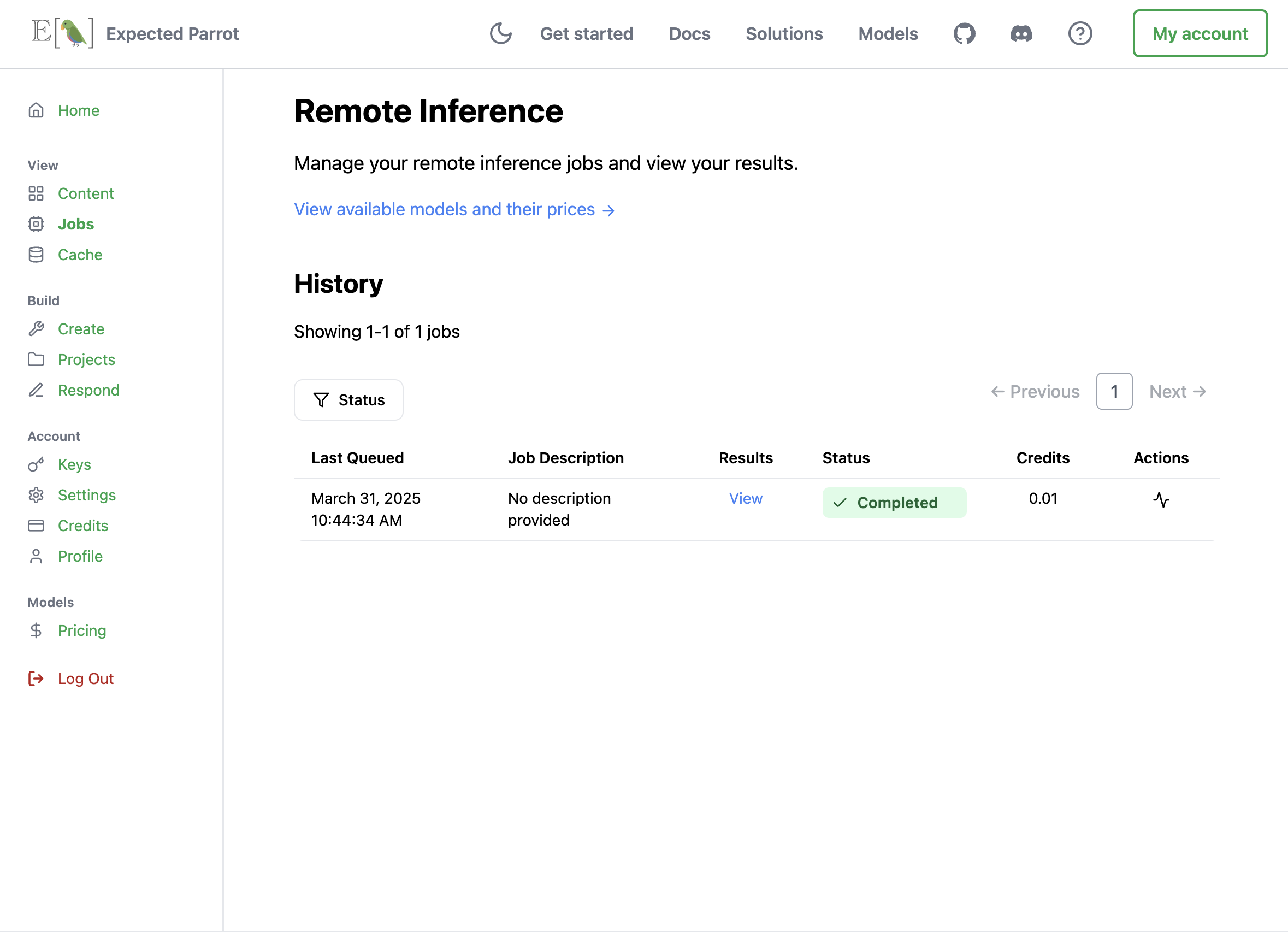
When the job has finished, it will appear with a status of *Completed*:
Running surveys with your own keys does *not* consume credits. Learn more about purchasing credits and calculating costs at the credits section.
## Using remote inference
When remote inference is activated, calling the run() method will send a survey to the Expected Parrot server. You can access results and all information about the job (history, costs, etc.) from your workspace or your [Jobs](https://www.expectedparrot.com/home/remote-inference) page.
For example, here we run a simple survey with remote inference activated and inspect the job information that is automatically posted. We optionally pass description and visibility parameters (these can be edited at any time):
```python theme={null}
from edsl import Model, QuestionFreeText, Survey
m = Model("gemini-1.5-flash")
q = QuestionFreeText(
question_name = "prime",
question_text = "Is 2 a prime number?"
)
survey = Survey(questions = [q])
results = survey.by(m).run(
remote_inference_description = "Example survey", # optional
remote_inference_visibility = "public" # optional
)
```
Output (details will be unique to your job):
```bash theme={null}
✓ Current Status: Job completed and Results stored on Expected Parrot: http://www.expectedparrot.com/content/cfc51a12-63fe-41cf-b441-66d78ba47fb0
```
When the job has finished, it will appear with a status of *Completed*:
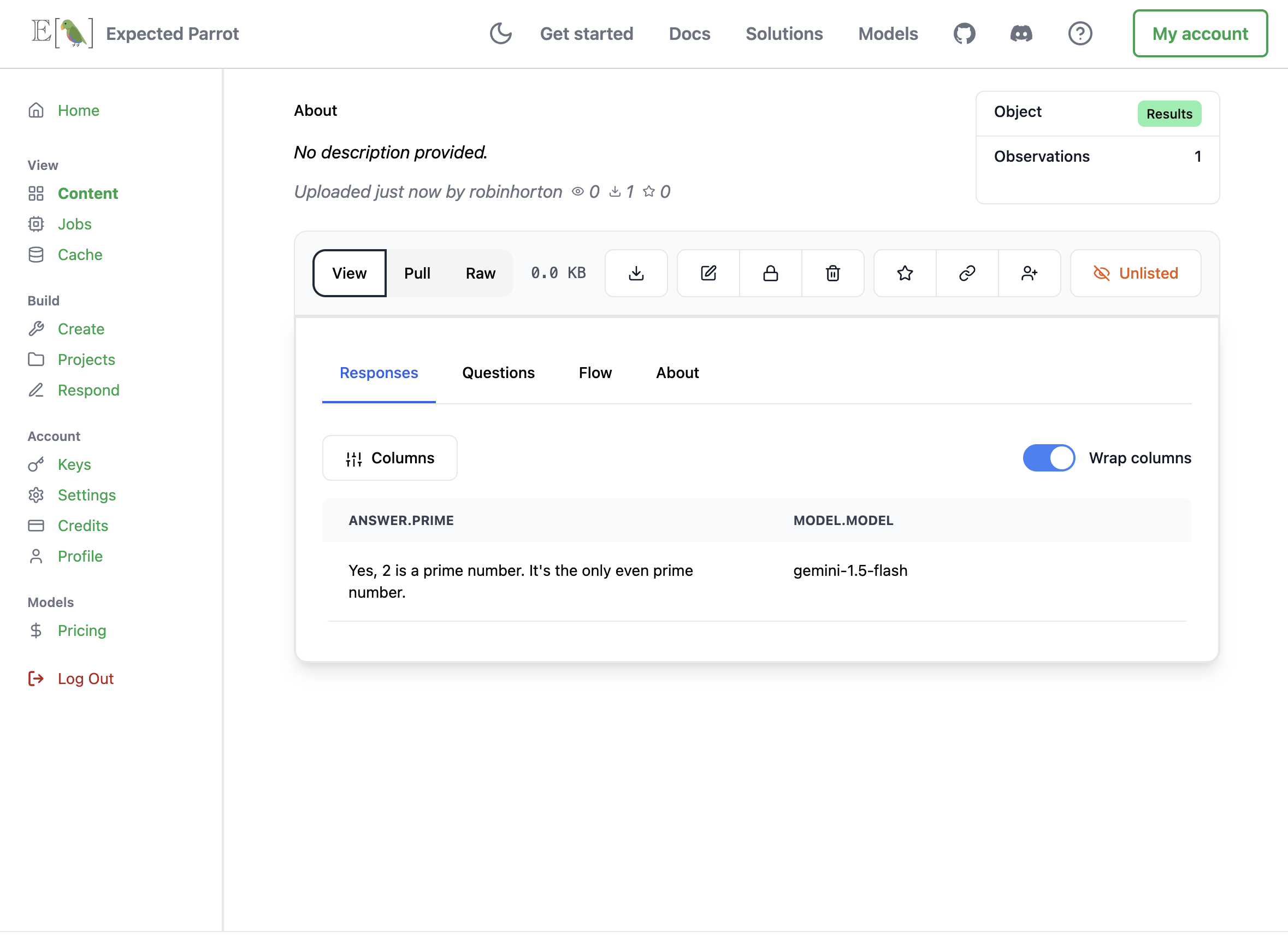
 We can view the results of the job:
 ## Job details and costs
When you run a job using your Expected Parrot API key you are charged credits based on the number of tokens used. (When you run a job using your own keys you are charged directly by service providers based on the terms of your accounts.)
Before running a job, you can estimate the cost of the job by calling the estimate\_job\_cost() method on the Job object (a survey combined with a model). This will return information about the estimated total cost, input tokens, output tokens and per-model costs:
For example, here we estimate the cost of running a simple survey with a model:
```python expandable theme={null}
from edsl import Model, QuestionFreeText, Survey
m = Model("gemini-1.5-flash")
q = QuestionFreeText(
question_name = "prime",
question_text = "Is 2 a prime number?"
)
survey = Survey(questions = [q])
job = survey.by(m)
estimated_job_cost = job.estimate_job_cost()
estimated_job_cost
Output:
{'estimated_total_cost_usd': 1.575e-06,
'estimated_total_input_tokens': 5,
'estimated_total_output_tokens': 4,
'model_costs': [{'inference_service': 'google',
'model': 'gemini-1.5-flash',
'estimated_cost_usd': 1.575e-06,
'estimated_input_tokens': 5,
'estimated_output_tokens': 4}]}
```
We can also estimate the cost in credits to run the job remotely by passing the job to the remote\_inference\_cost() method of a `Coop` client object:
```python theme={null}
from edsl import Coop
coop = Coop()
estimated_remote_inference_cost = coop.remote_inference_cost(job) # using the job object from above
estimated_remote_inference_cost
```
Output:
```python theme={null}
{'credits': 0.01, 'usd': 1.575e-06}
```
Details on these methods can be found in the [credits](/en/latest/credits) section.
After running a job, you can view the actual cost in your job history or by calling the remote\_inference\_cost() method and passing it the job UUID (this is distinct from the results UUID, and can be found in your job history page).
You can also check the details of a job using the remote\_inference\_get() method as pass it the job UUID.
*Note:* When you run a job using your own keys, the cost estimates are based on the prices listed in the [model pricing page](https://www.expectedparrot.com/getting-started/coop-pricing). Your actual charges from service providers may vary based on the terms of your accounts with service providers.
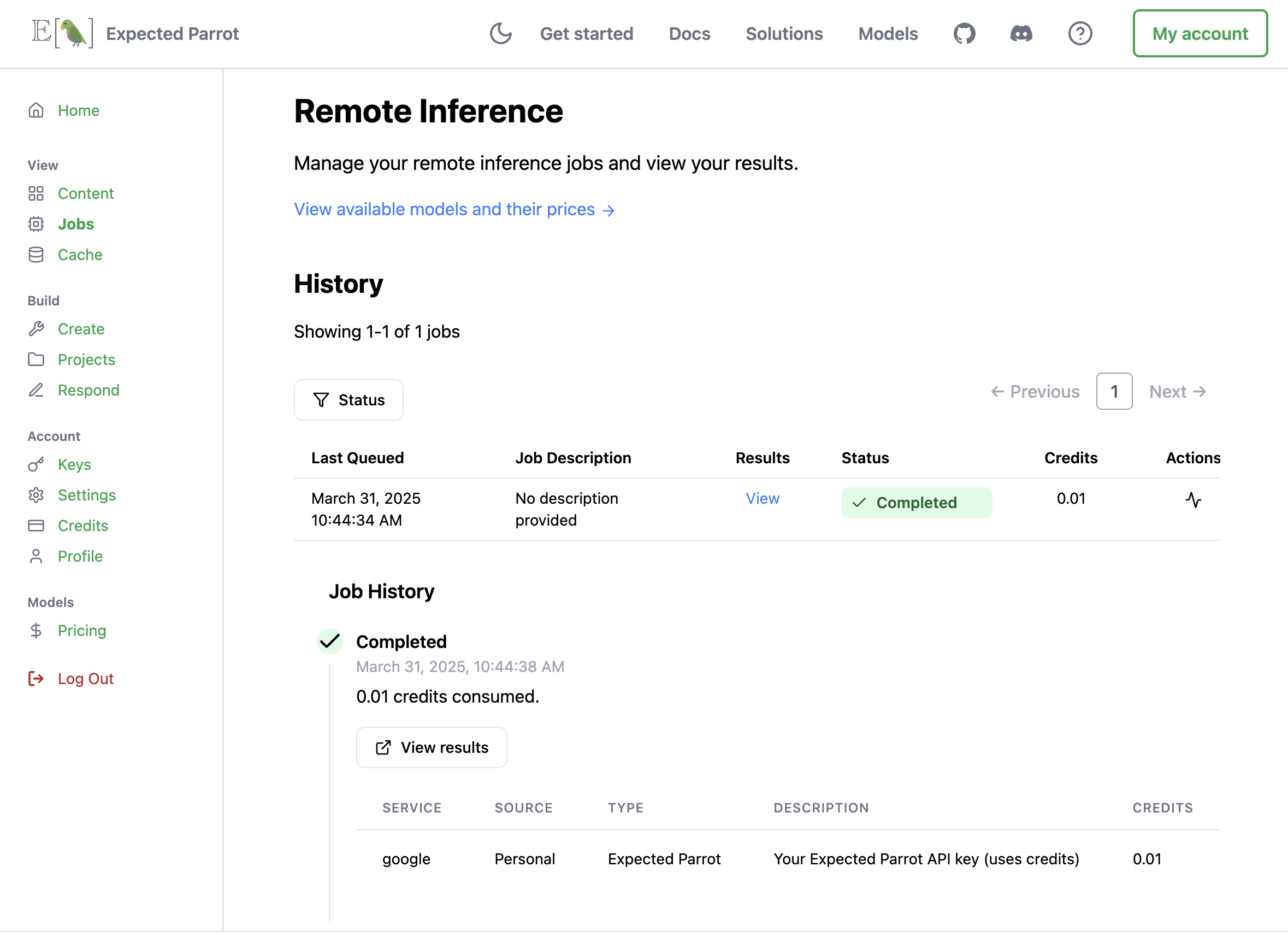
## Job history
You can click on any job to view its history. When a job fails, the job history logs will describe the error that caused the failure. The job history also shows which key was used to run each job (your own key, a key that has been share with you or your Expected Parrot API key):
## Job details and costs
When you run a job using your Expected Parrot API key you are charged credits based on the number of tokens used. (When you run a job using your own keys you are charged directly by service providers based on the terms of your accounts.)
Before running a job, you can estimate the cost of the job by calling the estimate\_job\_cost() method on the Job object (a survey combined with a model). This will return information about the estimated total cost, input tokens, output tokens and per-model costs:
For example, here we estimate the cost of running a simple survey with a model:
```python expandable theme={null}
from edsl import Model, QuestionFreeText, Survey
m = Model("gemini-1.5-flash")
q = QuestionFreeText(
question_name = "prime",
question_text = "Is 2 a prime number?"
)
survey = Survey(questions = [q])
job = survey.by(m)
estimated_job_cost = job.estimate_job_cost()
estimated_job_cost
Output:
{'estimated_total_cost_usd': 1.575e-06,
'estimated_total_input_tokens': 5,
'estimated_total_output_tokens': 4,
'model_costs': [{'inference_service': 'google',
'model': 'gemini-1.5-flash',
'estimated_cost_usd': 1.575e-06,
'estimated_input_tokens': 5,
'estimated_output_tokens': 4}]}
```
We can also estimate the cost in credits to run the job remotely by passing the job to the remote\_inference\_cost() method of a `Coop` client object:
```python theme={null}
from edsl import Coop
coop = Coop()
estimated_remote_inference_cost = coop.remote_inference_cost(job) # using the job object from above
estimated_remote_inference_cost
```
Output:
```python theme={null}
{'credits': 0.01, 'usd': 1.575e-06}
```
Details on these methods can be found in the [credits](/en/latest/credits) section.
After running a job, you can view the actual cost in your job history or by calling the remote\_inference\_cost() method and passing it the job UUID (this is distinct from the results UUID, and can be found in your job history page).
You can also check the details of a job using the remote\_inference\_get() method as pass it the job UUID.
*Note:* When you run a job using your own keys, the cost estimates are based on the prices listed in the [model pricing page](https://www.expectedparrot.com/getting-started/coop-pricing). Your actual charges from service providers may vary based on the terms of your accounts with service providers.
## Job history
You can click on any job to view its history. When a job fails, the job history logs will describe the error that caused the failure. The job history also shows which key was used to run each job (your own key, a key that has been share with you or your Expected Parrot API key):
 ## Remote inference methods
### Coop class
> #### *class* edsl.coop.coop.Coop(*api\_key: str | None = None*, *url: str | None = None*)[\[source\]](https://github.com/expectedparrot/edsl/blob/main/edsl/coop/coop.py)
Bases: `CoopFunctionsMixin`
Client for the Expected Parrot API that provides cloud-based functionality for EDSL.
The Coop class is the main interface for interacting with Expected Parrot’s cloud services. It enables:
1. Storing and retrieving EDSL objects (surveys, agents, models, results, etc.)
2. Running inference jobs remotely for better performance and scalability
3. Retrieving and caching interview results
4. Managing API keys and authentication
5. Accessing model availability and pricing information
The client handles authentication, serialization/deserialization of EDSL objects, and communication with the Expected Parrot API endpoints. It also provides methods for tracking job status and managing results.
When initialized without parameters, Coop will attempt to use an API key from: 1. The EXPECTED\_PARROT\_API\_KEY environment variable 2. A stored key in the user’s config directory 3. Interactive login if needed
**Attributes**:
api\_key (str): The API key used for authentication url (str): The base URL for the Expected Parrot API api\_url (str): The URL for API endpoints (derived from base URL)
> #### remote\_inference\_cost(*input: [Jobs](/en/latest/jobs#jobs-class "edsl.jobs.Jobs") | [Survey](/en/latest/surveys#survey-class "edsl.surveys.Survey")*, *iterations: int = 1*) → int[\[source\]](https://github.com/expectedparrot/edsl/blob/main/edsl/coop/coop.py)
Get the estimated cost in credits of a remote inference job.
**Parameters**: **input** – The EDSL job to send to the server.
```python theme={null}
>>> job = Jobs.example()
>>> coop.remote_inference_cost(input=job)
{'credits_hold': 0.77, 'usd': 0.0076950000000000005}
```
> #### remote\_inference\_create(*job: [Jobs](/en/latest/jobs#jobs-class "edsl.jobs.Jobs")*, *description: str | None = None*, *status: Literal\['queued', 'running', 'completed', 'failed', 'cancelled', 'cancelling', 'partial\_failed'] = 'queued'*, *visibility: Literal\['private', 'public', 'unlisted'] | None = 'unlisted'*, *initial\_results\_visibility: Literal\['private', 'public', 'unlisted'] | None = 'unlisted'*, *iterations: int | None = 1*, *fresh: bool | None = False*) → RemoteInferenceCreationInfo[\[source\]](https://github.com/expectedparrot/edsl/blob/main/edsl/coop/coop.py)
Create a remote inference job for execution in the Expected Parrot cloud.
This method sends a job to be executed in the cloud, which can be more efficient for large jobs or when you want to run jobs in the background. The job execution is handled by Expected Parrot’s infrastructure, and you can check the status and retrieve results later.
> **Parameters**:
job (Jobs): The EDSL job to run in the cloud description (str, optional): A human-readable description of the job status (RemoteJobStatus): Initial status, should be “queued” for normal use
Possible values: “queued”, “running”, “completed”, “failed”
**visibility (VisibilityType): Access level for the job information. One of:**
* “private”: Only accessible by the owner
* “public”: Accessible by anyone
* “unlisted”: Accessible with the link, but not listed publicly
initial\_results\_visibility (VisibilityType): Access level for the job results iterations (int): Number of times to run each interview (default: 1) fresh (bool): If True, ignore existing cache entries and generate new results
> **Returns**:
**RemoteInferenceCreationInfo: Information about the created job including:**
* uuid: The unique identifier for the job
* description: The job description
* status: Current status of the job
* iterations: Number of iterations for each interview
* visibility: Access level for the job
* version: EDSL version used to create the job
> **Raises**:
CoopServerResponseError: If there’s an error communicating with the server
> **Notes**:
* Remote jobs run asynchronously and may take time to complete
* Use remote\_inference\_get() with the returned UUID to check status
* Credits are consumed based on the complexity of the job
> **Example**:
```python theme={null}
>>> from edsl.jobs import Jobs
>>> job = Jobs.example()
>>> job_info = coop.remote_inference_create(job=job, description="My job")
>>> print(f"Job created with UUID: {job_info['uuid']}")
```
> #### remote\_inference\_get(*job\_uuid: str | None = None*, *results\_uuid: str | None = None*, *include\_json\_string: bool | None = False*) → RemoteInferenceResponse[\[source\]](https://github.com/expectedparrot/edsl/blob/main/edsl/coop/coop.py)
Get the status and details of a remote inference job.
This method retrieves the current status and information about a remote job, including links to results if the job has completed successfully.
**Parameters**:
job\_uuid (str, optional): The UUID of the remote job to check results\_uuid (str, optional): The UUID of the results associated with the job
(can be used if you only have the results UUID)
include\_json\_string (bool, optional): If True, include the json string for the job in the response
> **Returns**:
> **RemoteInferenceResponse: Information about the job including**:
job\_uuid: The unique identifier for the job results\_uuid: The UUID of the results results\_url: URL to access the results status: Current status (“queued”, “running”, “completed”, “failed”) version: EDSL version used for the job job\_json\_string: The json string for the job (if include\_json\_string is True) latest\_job\_run\_details: Metadata about the job status
> **interview\_details: Metadata about the job interview status (for jobs that have reached running status)**
total\_interviews: The total number of interviews in the job completed\_interviews: The number of completed interviews interviews\_with\_exceptions: The number of completed interviews that have exceptions exception\_counters: A list of exception counts for the job
exception\_type: The type of exception inference\_service: The inference service model: The model question\_name: The name of the question exception\_count: The number of exceptions
failure\_reason: The reason the job failed (failed jobs only) failure\_description: The description of the failure (failed jobs only) error\_report\_uuid: The UUID of the error report (partially failed jobs only) cost\_credits: The cost of the job run in credits cost\_usd: The cost of the job run in USD expenses: The expenses incurred by the job run
service: The service model: The model token\_type: The type of token (input or output) price\_per\_million\_tokens: The price per million tokens tokens\_count: The number of tokens consumed cost\_credits: The cost of the service/model/token type combination in credits cost\_usd: The cost of the service/model/token type combination in USD
> **Raises**:
ValueError: If neither job\_uuid nor results\_uuid is provided CoopServerResponseError: If there’s an error communicating with the server
> **Notes**:
* Either job\_uuid or results\_uuid must be provided
* If both are provided, job\_uuid takes precedence
* For completed jobs, you can use the results\_url to view or download results
* For failed jobs, check the latest\_error\_report\_url for debugging information
> **Example**:
```python theme={null}
>>> job_status = coop.remote_inference_get("9f8484ee-b407-40e4-9652-4133a7236c9c")
>>> print(f"Job status: {job_status['status']}")
>>> if job_status['status'] == 'completed':
... print(f"Results available at: {job_status['results_url']}")
```
## Remote inference methods
### Coop class
> #### *class* edsl.coop.coop.Coop(*api\_key: str | None = None*, *url: str | None = None*)[\[source\]](https://github.com/expectedparrot/edsl/blob/main/edsl/coop/coop.py)
Bases: `CoopFunctionsMixin`
Client for the Expected Parrot API that provides cloud-based functionality for EDSL.
The Coop class is the main interface for interacting with Expected Parrot’s cloud services. It enables:
1. Storing and retrieving EDSL objects (surveys, agents, models, results, etc.)
2. Running inference jobs remotely for better performance and scalability
3. Retrieving and caching interview results
4. Managing API keys and authentication
5. Accessing model availability and pricing information
The client handles authentication, serialization/deserialization of EDSL objects, and communication with the Expected Parrot API endpoints. It also provides methods for tracking job status and managing results.
When initialized without parameters, Coop will attempt to use an API key from: 1. The EXPECTED\_PARROT\_API\_KEY environment variable 2. A stored key in the user’s config directory 3. Interactive login if needed
**Attributes**:
api\_key (str): The API key used for authentication url (str): The base URL for the Expected Parrot API api\_url (str): The URL for API endpoints (derived from base URL)
> #### remote\_inference\_cost(*input: [Jobs](/en/latest/jobs#jobs-class "edsl.jobs.Jobs") | [Survey](/en/latest/surveys#survey-class "edsl.surveys.Survey")*, *iterations: int = 1*) → int[\[source\]](https://github.com/expectedparrot/edsl/blob/main/edsl/coop/coop.py)
Get the estimated cost in credits of a remote inference job.
**Parameters**: **input** – The EDSL job to send to the server.
```python theme={null}
>>> job = Jobs.example()
>>> coop.remote_inference_cost(input=job)
{'credits_hold': 0.77, 'usd': 0.0076950000000000005}
```
> #### remote\_inference\_create(*job: [Jobs](/en/latest/jobs#jobs-class "edsl.jobs.Jobs")*, *description: str | None = None*, *status: Literal\['queued', 'running', 'completed', 'failed', 'cancelled', 'cancelling', 'partial\_failed'] = 'queued'*, *visibility: Literal\['private', 'public', 'unlisted'] | None = 'unlisted'*, *initial\_results\_visibility: Literal\['private', 'public', 'unlisted'] | None = 'unlisted'*, *iterations: int | None = 1*, *fresh: bool | None = False*) → RemoteInferenceCreationInfo[\[source\]](https://github.com/expectedparrot/edsl/blob/main/edsl/coop/coop.py)
Create a remote inference job for execution in the Expected Parrot cloud.
This method sends a job to be executed in the cloud, which can be more efficient for large jobs or when you want to run jobs in the background. The job execution is handled by Expected Parrot’s infrastructure, and you can check the status and retrieve results later.
> **Parameters**:
job (Jobs): The EDSL job to run in the cloud description (str, optional): A human-readable description of the job status (RemoteJobStatus): Initial status, should be “queued” for normal use
Possible values: “queued”, “running”, “completed”, “failed”
**visibility (VisibilityType): Access level for the job information. One of:**
* “private”: Only accessible by the owner
* “public”: Accessible by anyone
* “unlisted”: Accessible with the link, but not listed publicly
initial\_results\_visibility (VisibilityType): Access level for the job results iterations (int): Number of times to run each interview (default: 1) fresh (bool): If True, ignore existing cache entries and generate new results
> **Returns**:
**RemoteInferenceCreationInfo: Information about the created job including:**
* uuid: The unique identifier for the job
* description: The job description
* status: Current status of the job
* iterations: Number of iterations for each interview
* visibility: Access level for the job
* version: EDSL version used to create the job
> **Raises**:
CoopServerResponseError: If there’s an error communicating with the server
> **Notes**:
* Remote jobs run asynchronously and may take time to complete
* Use remote\_inference\_get() with the returned UUID to check status
* Credits are consumed based on the complexity of the job
> **Example**:
```python theme={null}
>>> from edsl.jobs import Jobs
>>> job = Jobs.example()
>>> job_info = coop.remote_inference_create(job=job, description="My job")
>>> print(f"Job created with UUID: {job_info['uuid']}")
```
> #### remote\_inference\_get(*job\_uuid: str | None = None*, *results\_uuid: str | None = None*, *include\_json\_string: bool | None = False*) → RemoteInferenceResponse[\[source\]](https://github.com/expectedparrot/edsl/blob/main/edsl/coop/coop.py)
Get the status and details of a remote inference job.
This method retrieves the current status and information about a remote job, including links to results if the job has completed successfully.
**Parameters**:
job\_uuid (str, optional): The UUID of the remote job to check results\_uuid (str, optional): The UUID of the results associated with the job
(can be used if you only have the results UUID)
include\_json\_string (bool, optional): If True, include the json string for the job in the response
> **Returns**:
> **RemoteInferenceResponse: Information about the job including**:
job\_uuid: The unique identifier for the job results\_uuid: The UUID of the results results\_url: URL to access the results status: Current status (“queued”, “running”, “completed”, “failed”) version: EDSL version used for the job job\_json\_string: The json string for the job (if include\_json\_string is True) latest\_job\_run\_details: Metadata about the job status
> **interview\_details: Metadata about the job interview status (for jobs that have reached running status)**
total\_interviews: The total number of interviews in the job completed\_interviews: The number of completed interviews interviews\_with\_exceptions: The number of completed interviews that have exceptions exception\_counters: A list of exception counts for the job
exception\_type: The type of exception inference\_service: The inference service model: The model question\_name: The name of the question exception\_count: The number of exceptions
failure\_reason: The reason the job failed (failed jobs only) failure\_description: The description of the failure (failed jobs only) error\_report\_uuid: The UUID of the error report (partially failed jobs only) cost\_credits: The cost of the job run in credits cost\_usd: The cost of the job run in USD expenses: The expenses incurred by the job run
service: The service model: The model token\_type: The type of token (input or output) price\_per\_million\_tokens: The price per million tokens tokens\_count: The number of tokens consumed cost\_credits: The cost of the service/model/token type combination in credits cost\_usd: The cost of the service/model/token type combination in USD
> **Raises**:
ValueError: If neither job\_uuid nor results\_uuid is provided CoopServerResponseError: If there’s an error communicating with the server
> **Notes**:
* Either job\_uuid or results\_uuid must be provided
* If both are provided, job\_uuid takes precedence
* For completed jobs, you can use the results\_url to view or download results
* For failed jobs, check the latest\_error\_report\_url for debugging information
> **Example**:
```python theme={null}
>>> job_status = coop.remote_inference_get("9f8484ee-b407-40e4-9652-4133a7236c9c")
>>> print(f"Job status: {job_status['status']}")
>>> if job_status['status'] == 'completed':
... print(f"Results available at: {job_status['results_url']}")
```